

Listen vs Enforce
What's the difference between listen & enforce?
Mode of operation
Profiles must be configured to run either parallel to or in-line with your AI tool.
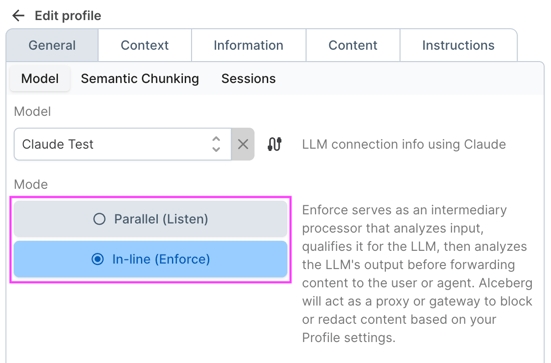
Enforce
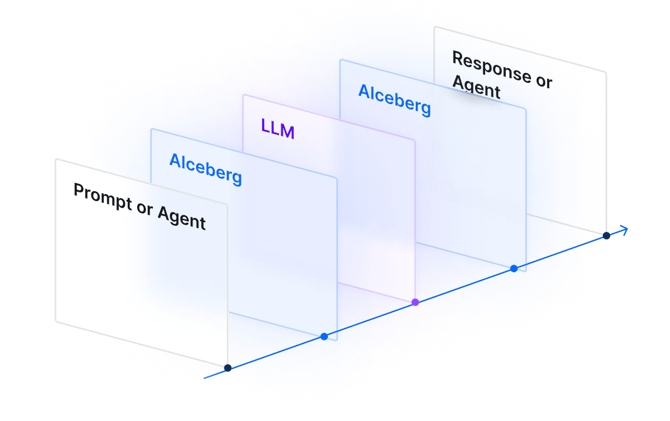
When enabled, Aiceberg sits between your AI tool and your LLM. Any prompts or other requests are forwarded to Aiceberg, evaluated for Signals and against your Profile settings, and acted upon based on your policies. Aiceberg may block, modify, or allow the content to proceed to your LLM.
For the return trip from your LLM to your AI tool, content is routed through Aiceberg again, evaluated, and acted upon according to your Profile settings. Regardless of how Signals are configured in your Profile, the Signal evaluation results and log are visible in Monitoring.
Listen
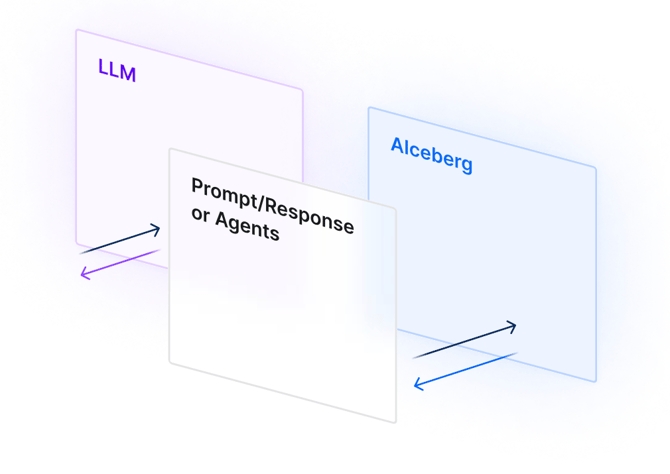
When a Profile is set to Listen, tool inputs and LLM outputs are forwarded to Aiceberg for evaluation separately from the traffic going to the LLM. Because Aiceberg is not in between your tool and your LLM, prompts and responses are not acted upon. Aiceberg will classify content, record Signal and other results, and pass the resulting telemetry back to your tool along with a recommended action based on your settings.
This mode is useful when you need a record of all traffic and signal telemetry, but do not need Aiceberg to enforce policy in-line.
API Usage
Usage of the Aiceberg API to submit prompts and responses is described below.
UI (Playground)
Users can test prompts through the Playground whether the Profile is in Listen or Enforce. The Playground currently only supports the prompt half of Listen — there is no way via the UI to submit a response for a given prompt.
As an alternative, after obtaining the prompt ID from the Playground, you can call the POST /response API endpoint and optionally include the parameter "log_group": "playground" when submitting the response.
Last updated